
Give contractors Microsoft 365 access. No MDM. No VDI.
Employees go through Intune. Contractors can't. PosturePass checks the device at sign-in and feeds the result to Conditional Access.
Key facts
- PosturePass verifies the device at sign-in and sends a compliance signal to Microsoft Entra Conditional Access. Existing Conditional Access policies then grant or block access.
- No MDM, Intune, or management profile is installed on the contractor's device.
- PosturePass checks disk encryption, antivirus, firewall, operating system updates, screen lock, and risky remote access tools on Windows, macOS and Linux.
- Works for B2B guest users, contractors from organizations without Entra, and independent operators.
- Conditional Access requires Microsoft Entra ID P1, included in Microsoft 365 E3, E5 and Business Premium. Contractors do not need Intune licences.
- Failed checks show the user guided remediation steps; most issues are resolved without a help-desk ticket.
How verification fits inside your Entra access flow
Sign-in stays the same. PosturePass adds a device check before access is granted.
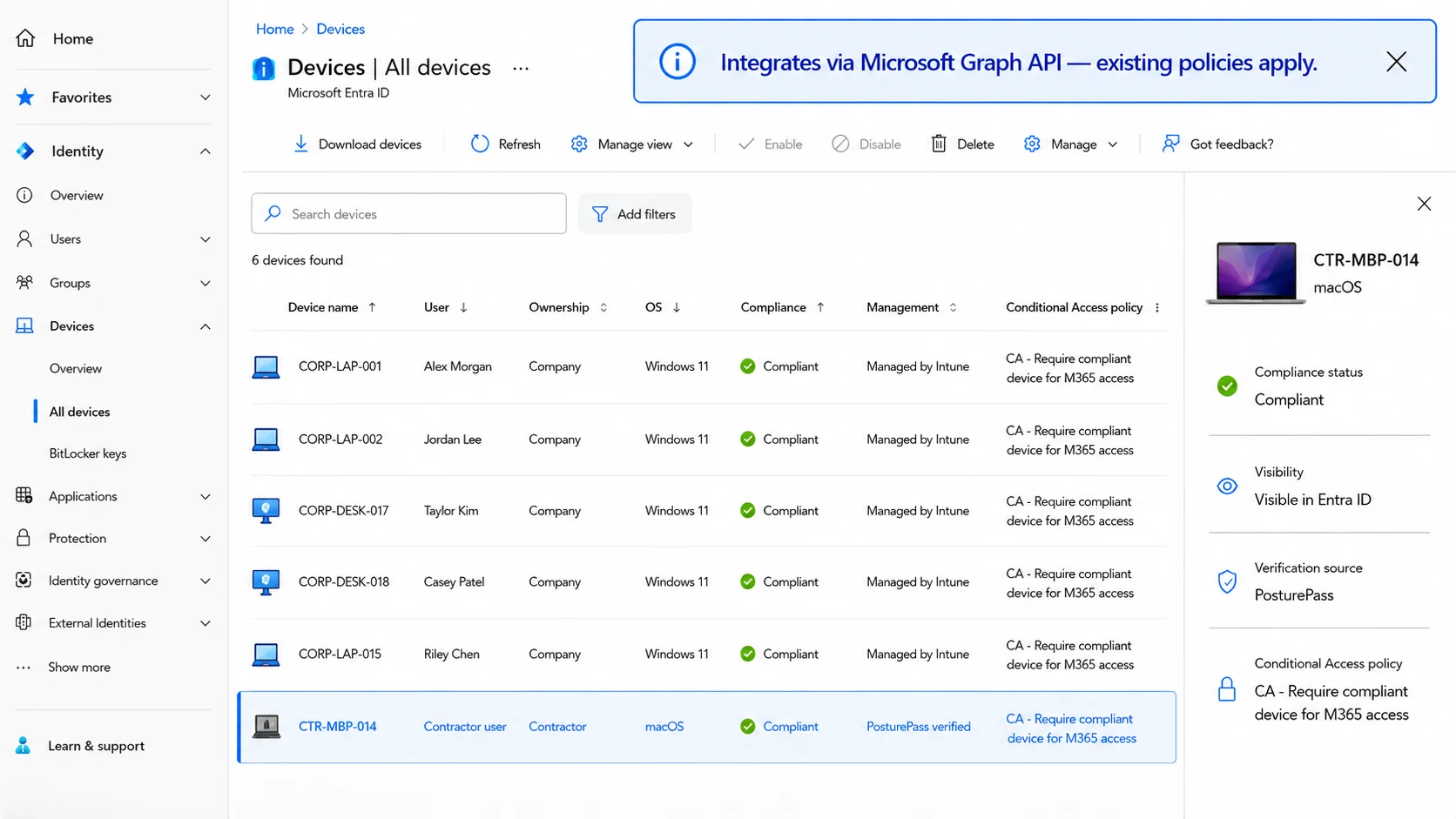
PosturePass verifies the contractor device and makes the result available to Microsoft Entra ID, where your existing Conditional Access policy grants or blocks access.
Illustrative Entra ID view.
Contractor signs in to Microsoft 365
Sign-in, MFA, and identity stay the same.
PosturePass checks the device
A light agent checks encryption, antivirus, firewall, OS version, and screen lock.
Entra Conditional Access reads the result
PosturePass sends the compliance signal. Your policies grant or block.
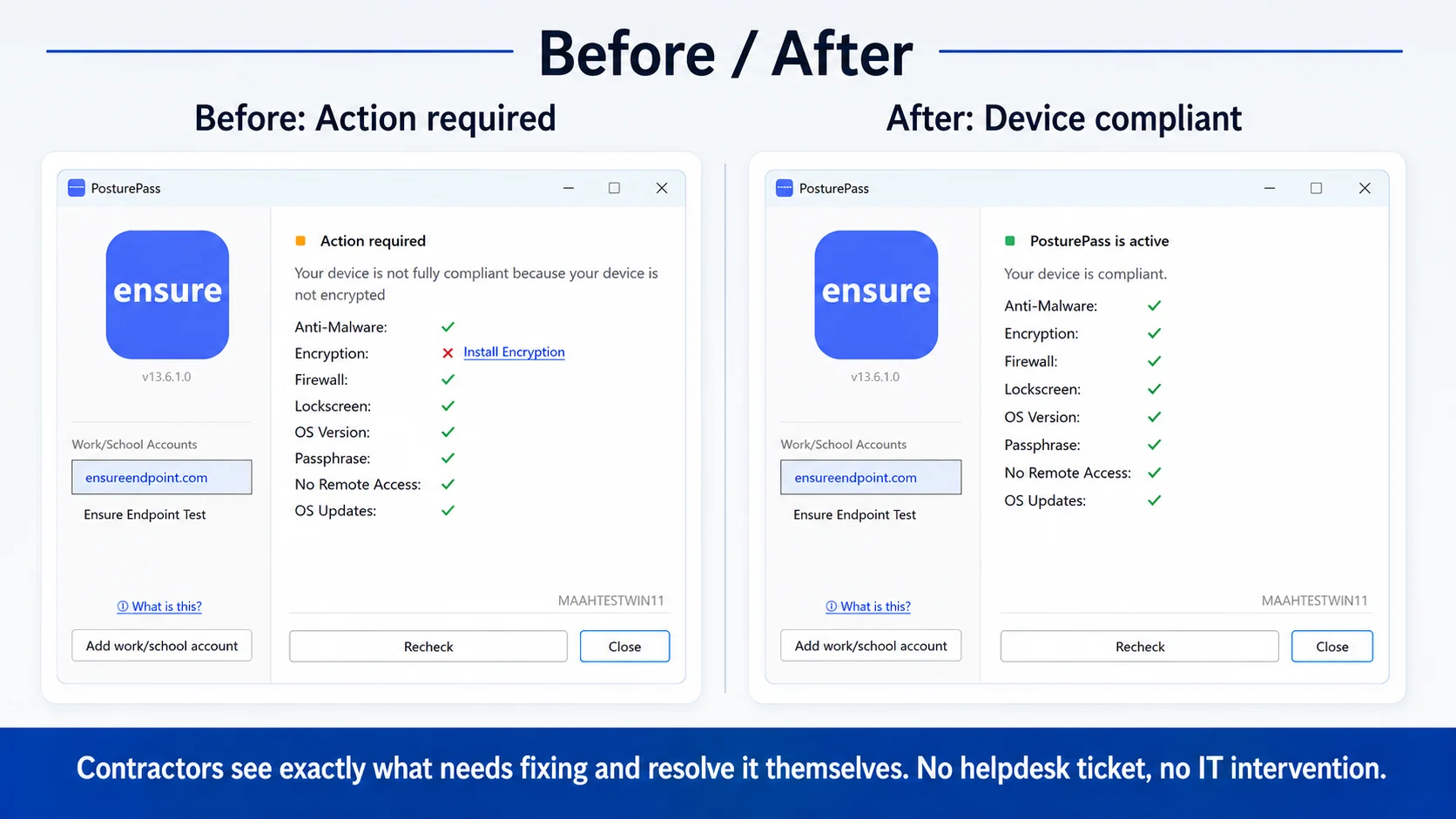
Failed devices get guided fix steps
Users can fix the issue and re-check without contacting IT.
Every check is logged
Timestamped record of result, controls, and remediation.
BYOD endpoint security without full MDM enrollment
Full MDM is the wrong tool for personal and contractor devices. PosturePass verifies the controls that matter without taking over the device.
No management profile
No MDM enrollment on the user's BYOD laptop. No company ownership of a personal device.
No remote wipe, no remote control
PosturePass reads posture and reports a result. It does not push apps, change settings, or wipe data.
Controls still verified
Encryption, antivirus, firewall, OS version, and screen lock are checked at sign-in, then every hour.
Why Intune does not cover external users
Cross-tenant enrollment is usually blocked
The contractor's org has to allow MDM from your tenant. Most don't.
Privacy and legal stall rollout
Enrollment puts a management profile on personal devices. HR and legal push back.
PosturePass verifies without enrolling
The agent checks controls. No MDM profile, no remote management, no remote wipe.
If a device fails, the user sees fix steps
Most issues are resolved by the user without a help-desk ticket.
Windows example
CUSTOMER RESULTS
A regulated U.S. company in the insurance industry moved more than 2,000 contractors off VDI in eight weeks.
Read the case studyEvery check writes a record you can hand to an auditor
Exportable for ISO 27001, NYDFS, and similar frameworks. See the compliance evidence page →
Sample audit log
Frequently Asked Questions
Still have questions?
Talk to our team about your specific compliance or distribution requirements.
Book a demoWeighing the cost of keeping VDI for contractors?
Compare to Citrix VDI